Maico ECA 100 ipro RCH
| Vendor | Maico |
|---|---|
| Model | ECA 100 ipro RCH |
| Category | fan |
| EEP | D2-20-00 |
| Supports | off-level1-level2, repeater, controller-worker |
| EAN | 4012799842118 |
| Date added | 2026-02-12 |
| Product page | https://www.maico-ventilatoren.com/produkte/p/kleinraumventilatoren-eca-100-ipro-g19801/eca-100-ipro-rch-p71902p72301 |
Connection instructions
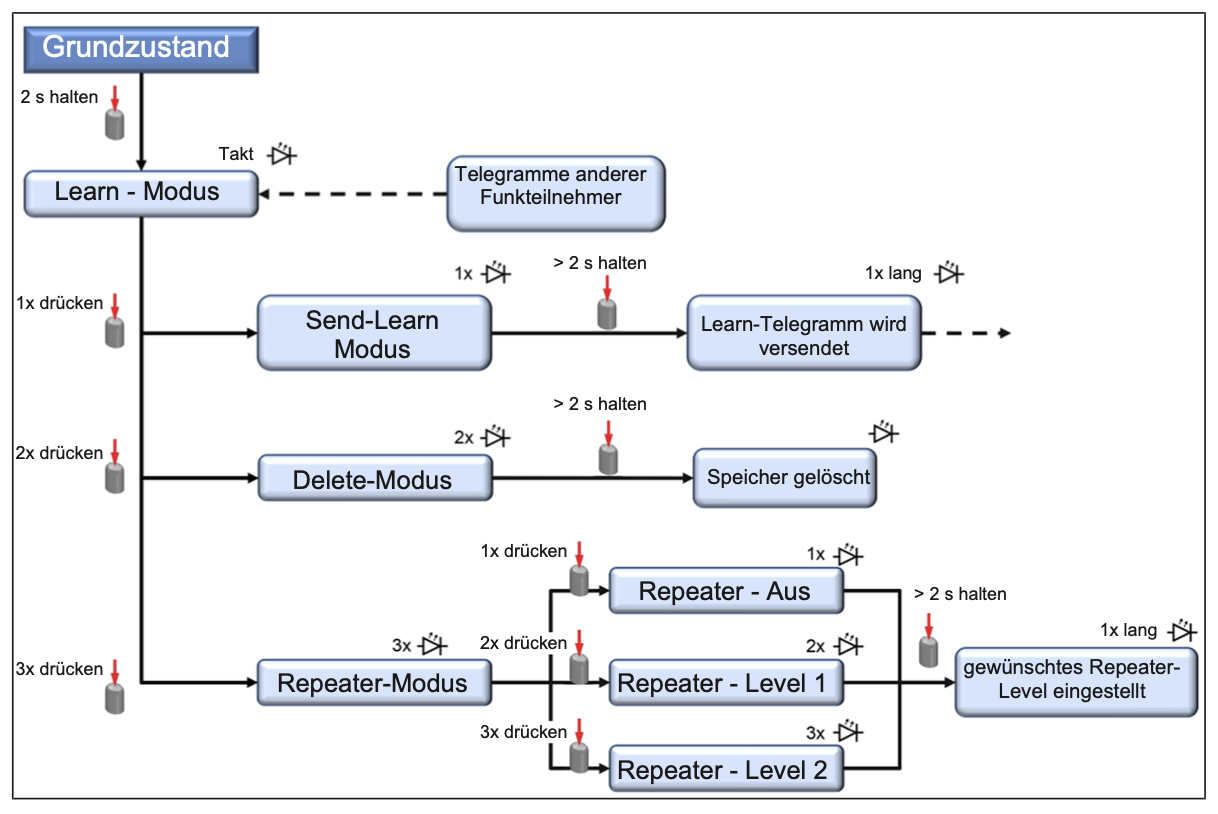
How to connect
The ECA 100 ipro RCH uses the EnOcean teach-in procedure to join a network.
- Put your EnOcean controller into learn/teach-in mode.
- On the device, navigate to Settings → EnOcean → Teach-in using the menu (see image above).
- Confirm the teach-in on the device. The controller should detect the device and assign it using EEP
D2-20-00. - Exit learn mode on the controller and verify the device appears in your device list.
For Home Assistant, install the EnOcean integration and follow the teach-in steps above while HA is in learning mode.